

Legacy edit storage
$80per TB
Forces you onto their overpriced cloud wrapper and locks “Bring Your Own Storage” behind an expensive Enterprise gate.
Built for Hybrid and remote creative teams, video editors and creators, post-production and studios, and enterprise and AI workflows.
Connect 90+ storage providers as local drives to find, stream, edit and transfer your largest files on demand and collaborate with anyone, anywhere.
The Universal File System for Claude · Cursor · Codex · Autonomous Agents
The Operating System for
Intelligent Workflows.
Stop bouncing around between agents, tools, apps, and consoles in order to manage your teams, systems and workflows. Performm MCP has you covered.
Governed execution: Zero local file downloads · Policy‑enforced permissions
CONNECT OVER 90+ STORAGE PROVIDERS
 Amazon S3
 Synology
 Google Drive
 Backblaze B2
 Azure Blob
 Dropbox
 Wasabi
 TrueNAS
 OneDrive
 Cloudflare R2
 OWC
OWC
 Google Cloud
 Box
Box
 Quantum
 Spaces
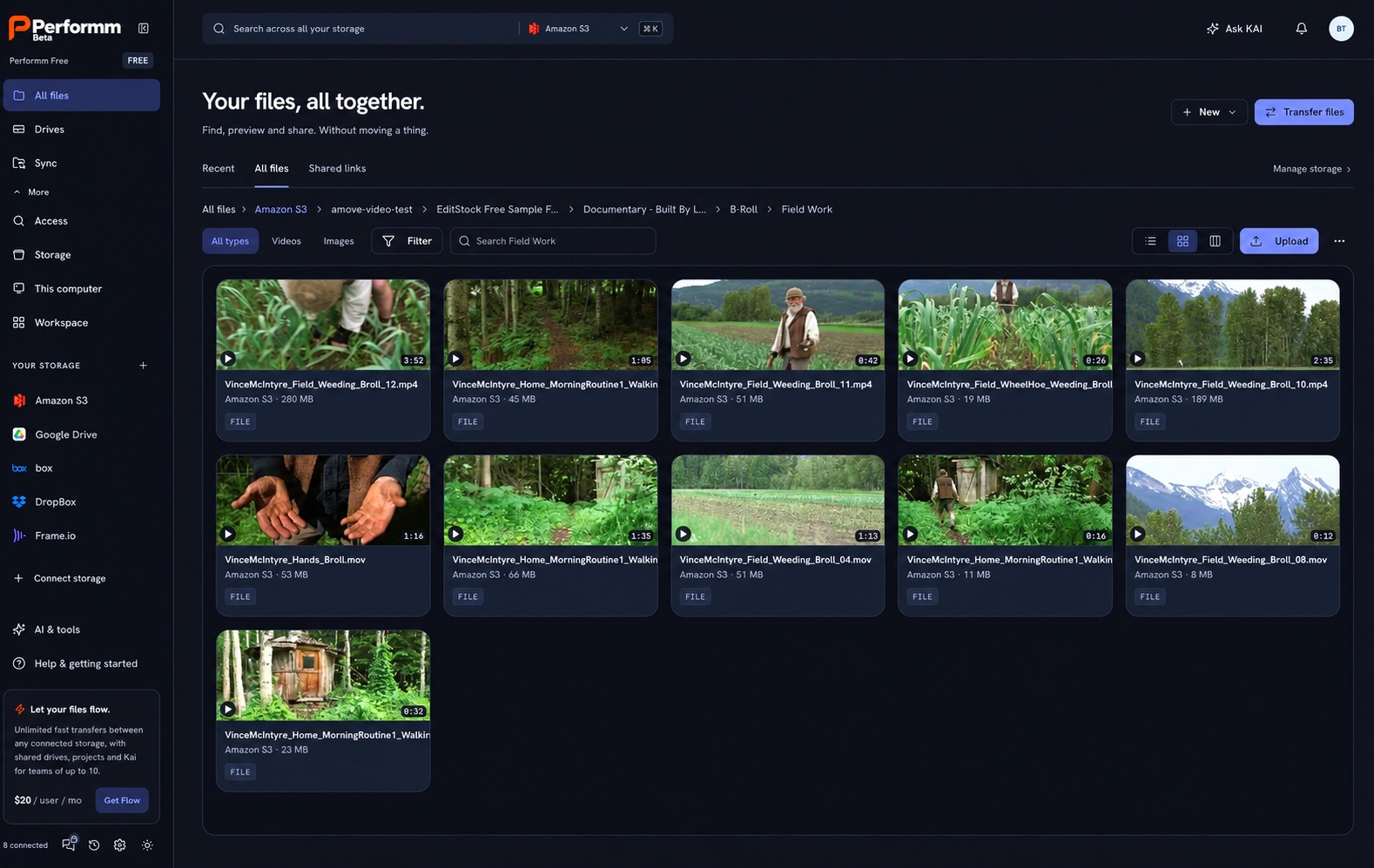
Ask Kai BetaExample
Find every wide shot of the cabin, across all my storage.
3 matches · nothing downloaded
Or connect your own agent over the Performm MCP Server.
User: Move all raw ProRes B-Roll shots from yesterday's shoot on Synology NAS to Wasabi archive and generate preview links.
{
  "source": "synology://production/2026-10-18/raw_broll/*.mov",
  "destination": "wasabi://archive/2026/shoot_broll/",
  "options": { "speed_tier": "fastr_line_rate", "checksum": "xxhash64" }
}
✔ 24 files identified (1.82 TB) · Line-rate transfer started · Check, Preview, Approve passed.
Stop paying the tax
Traditional platforms hold your storage hostage behind proprietary markups and charge you at every step of your workflow.
Legacy edit storage
$80per TB
Forces you onto their overpriced cloud wrapper and locks “Bring Your Own Storage” behind an expensive Enterprise gate.
Legacy fast transfers
$0.25per GB
Taxes you by the gigabyte just to deliver files between teams, clients, and vendors.
Legacy AI search
$30per seat
Indexes only one walled garden while leaving your NAS, cold archives, and other clouds invisible.
Performm replaces them all for $15/seat, right on the storage you already own.
Performm Standard, per seat a month, billed annually. $20 billed monthly.Core platform capabilities
Mount S3, Azure, NAS, or local drives as native volumes on macOS, Windows, and Linux. No caching the entire bucket locally.
02Multi-gigabit Fastr transfers between cloud and on-prem storage, with no Performm per-GB fees. Pair it with low-egress storage like Wasabi or Backblaze B2.
03Search across all connected endpoints instantly and share secure virtual drives with collaborators.
01Universal virtual drives · Zero migration
Connect AWS S3, Dropbox, Wasabi, Cloudflare, Google Drive, Azure, Synology, Quantum, any NAS, and local drives in seconds.
Mount any bucket, folder, or server as a native desktop drive (macOS, Windows, Linux) and share specific slices of storage with anyone, without moving files or handing over raw credentials.
Amazon S3objectMountedWasabiobjectMountedBackblaze B2objectMounted Google Cloud StorageobjectMounted
 Azure Blob StorageobjectMounted
 Synology NASSMBMountedQuantumNFSMounted
 Office shareSMBMounted
 This computerlocalMounted
02Editfly real-time streaming & editing Beta
Edit full-resolution video without downloading the media first. Editfly streams footage directly into Premiere Pro, DaVinci Resolve, Avid, or Final Cut on demand, from the cloud or NAS you already own. Performm Free streams and previews individual files from any connected storage; Editfly adds high-speed block volumes built for active multi-track timelines, with no massive downloads or duplicate proxy folders.
03High-speed delivery & hybrid sync
Send massive files globally at peak bandwidth with Fastr and run unlimited continuous syncs between local drives, office servers, and any cloud. Performm never charges per-GB transfer fees. Traditional clouds bill egress every time you move or download data; connect Wasabi, Backblaze B2, or your own NAS to keep those charges low or at zero (you only pay your storage provider’s standard rates). Every external recipient can connect their own storage at no cost, turning file delivery into instant collaboration.
Synology NAS → Amazon S3
Spot_30s_master/ · 2.4 TB · 1,284 files
Encrypted · resumableChecksum verified
04Multimodal AI search & governed agents (MCP) Beta
Most video tools call auto-transcription or a chatbot “AI.” Performm lets AI act on your files. Search: Ask Kai indexes video, audio transcripts, and metadata across all 90+ endpoints without moving the files. Action via MCP: connect agents like Claude, OpenAI models, or Cursor to the built-in Performm MCP Server to find clips, move renders to archive, or generate client links through standard, permissioned tools. Every action passes Check, Preview, Approve, Record, enforced outside the model.
the farmer talking about the weeding, out in the field
Agent via MCP: copy both clips to the Promo projectExample action, governed outside the model
Compare vs. incumbents
Incremental monthly software cost for a team that already owns storage (1 seat, 1 TB active media, 1 TB delivered/mo). Only Performm combines drive mounting, unlimited Fastr transfers, hybrid sync, AI search, and MCP agent governance in one $15 seat.
| One seat with 1 TB (Edit, transfer & AI) |
 Standard plan$15 a seat a month, annual plan Standard plan$15 a seat a month, annual plan |
 Business plan Business plan |
 Managed plan Managed plan |
 Growth plan Growth plan |
 Pay-As-You-Go / 1 TB Annual Pay-As-You-Go / 1 TB Annual |
|---|---|---|---|---|---|
| Monthly price, annual billing | $15a seat, plus your own storage | $75$27 seat + 600 GB at $8 per 100 GB | $75per TB, 5 users included | $29.75+ add-on · 500 GB; add-on price not listed | $215 to $250per TB · $0.25/GB pay-as-you-go (after 15 GB free), or $215/mo for 1 TB annual plan |
| Storage cost per TB a month | Your own rates: Backblaze B2 $6.95, Wasabi $7.99, or on-prem NAS | $80 ($8 per 100 GB beyond 400 GB) | $75 | Add-on price not listed | $70 after 5 free days |
| Storage lock-in | None. Connect the storage you already own (90+ providers) on every plan, even Free | Their cloud. Bring your own storage on Enterprise only | Their cloud. Bring your own storage on Enterprise only | Their cloud. Bring your own storage on Enterprise only | 30+ transfer connectors, no mounted drives |
| Editing storage included | Stream & edit directly on 90+ providers; Editfly block storage available, 200 GB Global storage included on Premium | 400 GB per member, on LucidLink's AWS | Sold per TB, on Suite | 500 GB per seat, on Shade | None (5-day temp staging, then $70/TB/mo) |
| Transfer and delivery | Unlimited high-speed transfers (Fastr) | Guest links | Suite Connect | Publish links | High-speed portals, billed per GB downloaded |
| Sync between storages | Unlimited syncs, local to cloud and multi-cloud | Not listed | Not listed | Not listed | One-way portal forwarding |
| Multimodal AI Search | Unlimited indexing across every connected storage Beta / Coming soon | Not listed | Not listed | Unlimited indexing, within Shade storage | Not listed |
| AI agents and governance | Native MCP server and bring your own AI, from $0 | MCP server, beta | Not listed | Not listed | Not listed |
Frequently asked questions
You are never auto-charged without permission. After 15 days, you can choose to subscribe to Standard for $15/month (annual billing) or automatically continue on Performm Free ($0 forever) with all your storage connections intact.
Never. Performm connects directly to the AWS S3, Wasabi, Backblaze, Google Drive, Dropbox, Box, SMB/NFS NAS, and local drives you already own. Your files stay in your storage under your keys.
Performm Free lets you connect any storage, mount virtual drives, and stream or edit individual video files with local offline caching. Editfly and Premium Global Storage provide dedicated, ultra-low-latency block volumes engineered for heavy multi-track collaborative timelines in Premiere Pro, DaVinci Resolve, and Final Cut.
No. Any external collaborator can receive Fastr deliveries or mount a shared drive into their own existing storage on Performm Free at $0 cost.
Performm never charges per-gigabyte transfer fees. When connecting your own cloud storage or your own AI API keys (BYO AI), you only ever pay your underlying cloud or model provider's standard rates.